Tuesday, December 11, 2012

Samsung Galaxy S 3 First Impressions

Continuing with my series of first impressions reviews of the devices I purchase, I present the Samsung Galaxy S 3.  I had actually ordered this phone several months ago and scored it while Verizon was still offering to grandfather in unlimited data plans.  And so far I've been generally happy with this new device.  Success measured by how many coworkers bought a Galaxy S 3, especially after having recently "upgraded" to something else.

Hardware

My previous exposure to Android powered phones was the Motorola Droid.  With an ARM Cortex A8 processor and 16 GB memory, it was definitely not a slouch in the hardware department when it came out.  This phone had a processor and memory that challenged the capabilities of my first desktop computer in college.  The Samsung Galaxy S 3 posts numbers better than twice as high as the OG Droid.  Memory is expandable to 64 GB and the form factor is nearly an inch larger on the diagonal.

Software

Two versions of Android later, the difference is noticeable.  Also noticeable is the change from Motoblur to Samsung TouchWiz.  Having never seen pure Android UI I can only make the comparison from one manufacturer's interface to another.  Google has built in and standardized a great deal of functionality into the operating system while allowing manufacturers ample leeway to differentiate their product; not always for the better.
I don't like most of Samsung's software on this phone.
The saving grace is that, under Android 4 and above, you the user can disable any application you want, including most of Samsung's proprietary code.  In fact I've done this with many apps, killing the original calendar, music players, and S Voice, along with some other bloatware.  Sorry Amazon Kindle app and Facebook; you're gone.  Fortunately, as an Android phone, the Galaxy has full access to the Google Play Store, where I was easily able to replace and expand the phone's built-in software.

Final word

While I like the Samsung Galaxy S 3, even as a replacement to the Motorola Droid, it has some issues but is still a guaranteed upgrade.

Buzz Off

Provided there is no allergic reaction, the first aid for a bee sting is simple. Quickly remove the stinger by scraping with the back edge of a blade or card.  After that, treat the injury as you would a puncture wound.  That is, wash with soap and clean water.  Because of the injected venom an insect sting can quickly become complicated.  In severe cases it can cause a condition known as anaphylaxis.  This life-threatening condition is characterized by a whole-body allergic reaction including hives and difficulty breathing.

Luckily, I am not that susceptible to bee venom.  But my minor allergic reaction to getting stung last summer means I am at increased risk of anaphylaxis in the future.  I was at summer camp at Camp Fiesta Island, San Diego, CA, the week of 4 July with my Boy Scout troop.  For the rest of this article, I present my point of view of an injury and its treatment.

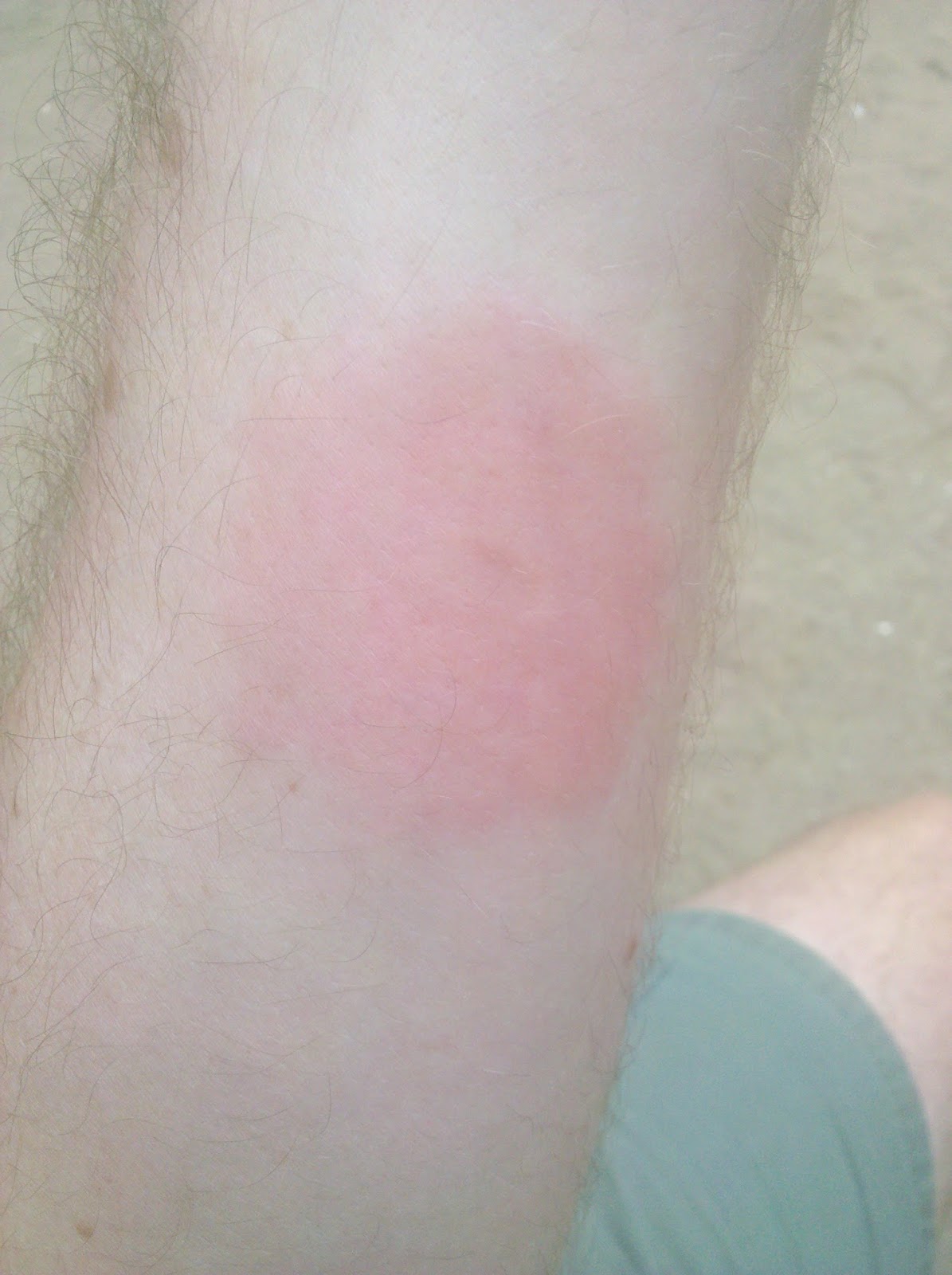
Here is a picture from immediately after the bee sting.  To give the viewer some perspective, that is my left forearm above a table.  The bee sting is the reddening spot on the right (underside) of the arm.  This bee had discovered a nice place to rest in a fold of my T-shirt when I brushed my arm against her.
Bee sting is on the side of the arm. Picture taken immediately after impact.

I knew this was a relatively minor injury for me and cleaned my arm after scraping out the stinger.  Then I watched for allergic reaction and was prepared to treat for shock.  As it happens, the bee sting did lead to an allergic reaction.  I treated the symptoms with calamine lotion to control the itching and antibiotic lotion to prevent infection. 
One day after I attacked a resting bee.

The venom spread slowly, as it does, through the muscle tissue in my arm.  It looked the worst several days after the attack.  
Bulls eye.  Three days later.

After about a week, I still had a bruise from the tissue damaged by the venom but had otherwise recovered.  It's important to note that I was not grievously injured here.  Bees leave only small puncture wounds but can cause serious allergic reactions.  This is clearly an allergic reaction but it is minor.  
Just a bruise.  

Thursday, November 8, 2012

All Hallows' Eve

Reign of Fire
Spyglass Entertainment Group
I'm going out for Halloween this year and I've decided what my costume is going to be.  I'm going as Denton Van Zan from the 2002 movie Reign of Fire. And here's how I made my costume.

The Vest

In the movie, Van Zan wears a heavily modified B-3 aviator jacket.  Credit goes to the keen eyes at Filmjackets.com for solving this one.  However, I really don't want to spend $1000 on a jacket in order to destroy it.  Fortunately, I found this bomber jacket on Amazon.com for $99.  At one tenth of the price, I'm much more comfortable cutting this one up to make it look like the movie prop.  
In order to craft my replica, I'll need a seam ripper and a speedy stitch. The sleeves come off with a bit of work, along with the buckle around the neck.  This jacket only has the one buckle so I'll just make two buckling epaulets and attach them to the shoulders.  If I had used the authentic B-3, I could use both included buckles but, as discussed, that's just not an option.  I also need to add two flat pockets to the front of the jacket, which will go on right on top of the existing pockets.  The American flag patch gets stitched on the left breast as shown in the pictures.  Simple as that.

The Rest of the Clothes

Gearing up
Nothing much to this part.  The rest of Van Zan's clothing, from the shemagh down to the boots, is military surplus.  Luckily, I live in a military town and we have an active surplus market at the MI Store.  I was able to get most of the costume there in one stop.  
Let's run down the shopping list here.  Black and olive drab shemagh (that's the neck wrap), black tactical gloves, pistol (or canteen) belt, insignia belt, pants, flag patch, and black combat boots.  In the film Van Zan is clearly wearing two belts and one glove (on the left).  Make sure you get the "blotchy" camouflage pattern pants and not the newer digital camo style.  
I have to modify one part of the costume here.  The tactical gloves all have full fingers.  Those get cut off with scissors, snip snip.

The Hair

Van Zan is bald and carries an epic beard.  Not really; it's kind of blond and scraggly.  Anyway, I've been growing a beard since September for unrelated reasons.  For the costume, I'll shave my head and think about coloring the beard.  It will need to be lightened from my natural reddish-brown to McConaughey's distinctly more blonde color.  

The Ink

Van Zan is heavily tattooed on the upper body.  I'm not currently in the market for tattoos so I'll need to come up with something else.  That alternate method will be body paint.  The internet is full of images good enough to make a stylized representation on myself.  It won't be identical to the movie make-up but, then again, how much of this costume really is?  This will probably mean shaving or even waxing my chest, back, and shoulders so the paint has a good surface to adhere to.  Alas; the indignities I subject myself to for my readers.

Weapons

Van Zan is clearly a well-armed dragon slayer.  He carries a kukri or "gurkha knife", a shorty Mossberg 500 shotgun, an Ultimax 100 Mk. 2 squad automatic weapon, and that ax.  However, I don't want to deal with carrying props while on a Halloween bar-crawl and I definitely don't want to deal with carrying weapons where I'm going.  So I'm going to leave all of these off my costume.  I may craft the ax later to bring to a convention.

Other Props

Two other props are featured in the movie.  First is the metal flask, ironically filled with water.  That's easy enough to buy at any store.  Next up is the dragon's tooth pendant.  I'll have to craft one of those.  Again, we don't need to be photo exact.  The great thing about costuming is that the viewer will fill in and correct any discrepancy on their own if you get it close enough.  

And that's it, my Reign of Fire costume is complete.  Now to go out and enjoy the holiday.
Costume complete

Saturday, September 15, 2012

Follow Me, Follow You

I noticed a lot of people have been circling me on Google+ lately. More than usual. I must be posting good content. I haven't circled back any of my most recent followers as I've been traveling and haven't reviewed them yet.
What's the criteria for getting a reciprocal circle? You have to also have good content.
An empty stream doesn't tell me anything about you or what you normally post about. Any mention of your SEO business or that you're a "social media expert" kind of disproves your claim. Only reposting one other person's content, which I have seen, doesn't get you circled; it gets them circled. Also, I use Reader, so a stream full of posts I could just subscribe to, well, you can probably figure it out by now. I look for interesting new content and analysis. Post about your articles and videos, for sure, but also go behind the scenes on the stream. I try to supply interesting content and I'll circle you back if you do too. 

Monday, July 30, 2012

HP TouchPad First Impressions

I missed the fire sale on HP TouchPad tablet but was able to find one easily after the fact. As I've explained before, I'm just an average techie who likes to review the gear he buys. I've delayed writing this in order to actually use the tablet enough to give a good report on the device.

HP TouchPad
The vast desert expanse of the tablet market.

Show me the money

The big issue with the TouchPad, while it was being sold by HP, was the price. List price for this tablet was US $500. That's the same price as the contemporarily released Apple iPad. That's simply the wrong price. HP is not in the same market as Apple.
The entire technology world, and especially Apple customers themselves, know that Apple customers pay a premium for their brand loyalty. HP products, on the other hand, are reasonably priced cameras and printers.
HP only stayed in the tablet market for a short time, citing poor sales for their decision to liquidate their remaining stock. The price for HP TouchPads soon stabilized around $350 among leading online resellers. HP clearly couldn't get the pricing right on their own, first overpricing then ridiculously underpricing the tablet. But functioning capitalist markets decide how to price goods and services effectively. And the market clearly supported a roughly $300 price tag. Clearly, the lesson learned from all this is, when entering a market where Apple is the only other player, factor out the Apple premium or sell your device on an auction website to determine pricing.

Hard times

Literally, the hardware is slick. It has a glossy black finish front and back. It's actually a bit large in the hand. I usually read paperbacks and not hardcover books so the tablet is uncomfortable as an electronic book. However, it is almost ten inches of diagonal screen size for excellent video display.
HP actually did a good job on the hardware side. The TouchPad is built around its 9.7 inch touchscreen. A dual-core, 1.2 GHz speed Snapdragon processor, 1 GB RAM, and up to 32 GB storage make for a responsive device. It communicates through Wi-Fi (802.11 a/b/g/n) and Bluetooth. Its sensors include everything but GPS and it has a front-facing camera for Hangouts. Overall, a good pile of parts.
One well-received feature is the microUSB charging cable. It's nice to not have to go searching for proprietary cords anymore. Like its market-leading competitor, though, this tablet needs a full Amp to charge. Most USB chargers only deliver half that since they only need to support the lower power requirements of cell phones.

A soft touch

HP chose its recently acquired Palm operating system, webOS, to run its tablet. That's disappointing.
Many web pages are too complicated to display properly in the built-in web browser. It doesn't have good support for frames. For example, Gmail is completely useless in the TouchPad browser unless the basic HTML option is selected. The browser can't handle scrolling the body of an email separately from the sidebar. There are also weird frame placements and artifacts for sites that overlay a frame for ads, like Cracked, or functionality, like YouTube. Remarkably, Blogger is quite usable because its frames are clearly defined spaces with their own scroll bars and page functions intact. Being a lower priority property in the Google-verse has its advantages.
The webOS on-screen keyboard is a bit oddly spaced but usable. It is much too big for thumb typing but it is almost the size of a full-sized keyboard when laid on a desk. As is my custom, I'm actually typing this on the TouchPad and it's quite easy to do, though I'll probably need to edit this on the computer to add in pictures and hypertext.
Included out of the box are the normal productivity applications like a calendar, which can't seem to access Google Calendar, an email application, which can't access Gmail, a clock, and QuickOffice, recently purchased by Google. An application for YouTube is included but it's just a wrapper for the webpage as it suffers from the same odd frame artifacts as the browser. For social media, the TouchPad comes with a Facebook app which can't be uninstalled. Which would be great if I were still using Facebook. Since tablets' default use case is as an electronic book reader, this one comes with Amazon Kindle pre-installed but no access to Google Books except through the browser. So, none of the Google features I already use but plenty of pre-installed programs for services I don't use.
HP offers an application store for its now-discontinued line of webOS products. But it isn't nearly as well-populated as either Google Play or that other one. And it's no wonder as webOS is officially on its deathbed. Few people want to spend time developing software for a system only receiving palliative care from its owners.
Fortunately, there is salvation, in the form of a new operating system, CyanogenMod. Versions for the TouchPad are still in alpha but promise ready access to the Android market and all the applications therein.

Verdict

The hardware is excellent and worth the current market price. The software leaves much to be desired and makes this tablet a good candidate for an operating system transplant. With prices falling past $250 and plenty of tablets still in stock, this product gets a qualified "buy" decision.

Tuesday, July 17, 2012

Longer than I meant to be away

I'm not dead, yet. I feel fine. I think I'll go for a walk. No, seriously, I've been more active posting and commenting directly to Google+ lately but I haven't forgotten my blog.
In recent news, I supervised my Boy Scout troop, "Hardcore" 444, at summer camp. We went to Camp Fiesta Island, right on Mission Bay in the heart of San Diego, CA, over the Independence Day holiday week. The city's fireworks display on the 4th left something to be desired, like the other 14 minutes and 45 seconds of the show.


I was still very impressed by how many fireworks they launched in nine seconds. Sea World was right next door and had the sky to themselves the rest of the night. But they launch fireworks every night of the week so they're old hands at that kind of thing. While at camp, I completed training in BSA Aquatics Supervision, finishing Safe Swim Defense and Safety Afloat along with both Swimming and Water Rescue and Paddle Craft Safety. That's a big boon to the aquatics program at Troop 444 and the rest of the council.
In personal news, I'm off the market, ladies. I'm dating my dream girl. She's a beautiful, smart, nerdy goddess and we even like all the same tabletop RPG games. We were introduced by a mutual friend who set us up on a blind date. So that's who to blame if it doesn't work out. Kim and I hit it off and we've been dating now for... wow, has it only been two months? Anyway, she's an instructor at the school near where I work.
And in business news, work is about the same. I'm still supporting the command here with IT Systems Management, essentially sustaining the same systems I was building four years ago. The division chief has decided to engage more with SharePoint and I was brought back on board with that since I was involved in it's early deployment.

Monday, May 7, 2012

Don't Push the Red Button

I have a certain level of knowledge about the issues security professionals face and the incidents they cause.

First some background on this incident. A piece of hardware was reset and the encryption keys it contained were "zeroized". Then a message was sent out to the entire section informing them not only of the exploit but also underlying vulnerabilities which carry the risk of a denial of service. Because this incident report came through internal channels, it contains too much secure information to post here. There wouldn't be enough left after redaction. I will, however, discuss the incident in generic terms as a case study. Of course, the risk has been addressed.

Up front, let's address the sender of the message. The message was sent from the Information Management Office, a higher level function than over-titled secretary but that's a distinction that's easy to be confused over.  Not that the IMO is unauthorized to distribute information about incidents in the office, but as a general rule nobody should be distributing information on exploits or vulnerabilities. So that's who sent it, but where did it go? To a large office full of non-security job functions. Read that as "potential threats".

Let's move on to the content of the message. The message reveals a successful, yet inadvertent, exploit of a vulnerability with a security device in the office. It clearly describes how to "zeroize" the device and also how long to return to operation. Reading between the lines, additional indicators are revealed. There is a piece of critical equipment in an unsecured location. Anyone in the field should immediately ask what else is in that location. Keeping in mind that these devices will not pass traffic unless it's encrypted, the victim was under a complete denial of service. That operational state could be further exploited while personnel are distracted by recovery efforts.

As a security professional, how do you protect your office from this?

First, educate the threats. This incident was caused by an untrained user accidentally resetting the device. Flat out, every user needs to be properly trained to operate the equipment they have contact with. Also, educate your users about information security. Disclosing the incident could have deeper repercussions than the incident itself. An attacker should rightly assume that the risks here have been addressed and they should look for another vector. Or an attacker might just try to replicate the exploit anyway in the chance that it hasn't been addressed.

Secondly, lock up the vulnerabilities. I mean that literally. Lock up any hardware that doesn't require user contact. That's everything but the keyboard and mouse. And not just the physical hardware but also the software. Employ "least user privilege" by only giving users the amount of access they need for their jobs. An employee who's job description does not include "reset the encryption device" should not have access to that button.

Third, finish your risk assessment. Tally up the costs in dealing with your threats and vulnerabilities. Put it in real dollar amounts so you can do a quantitative comparison. In this case, a security container and user education. Now tally up the costs of a threat meeting a vulnerability to become an exploit. Again, in dollars out of the company budget. For this incident, it was one week of lost work by one office being unable to do secure business plus the cost of rekeying the encryption device. Finally, compare those dollar amounts. Assume the risk only if the cost of mitigation, in actual company money, is too high.